This guide helps you configure your development environment, obtain API credentials, and implement best practices for building robust integrations with COR.

Get your API credentials

Before you can make API requests, you need to obtain your API Key and Client Secret from the COR dashboard.
1

Access API settings

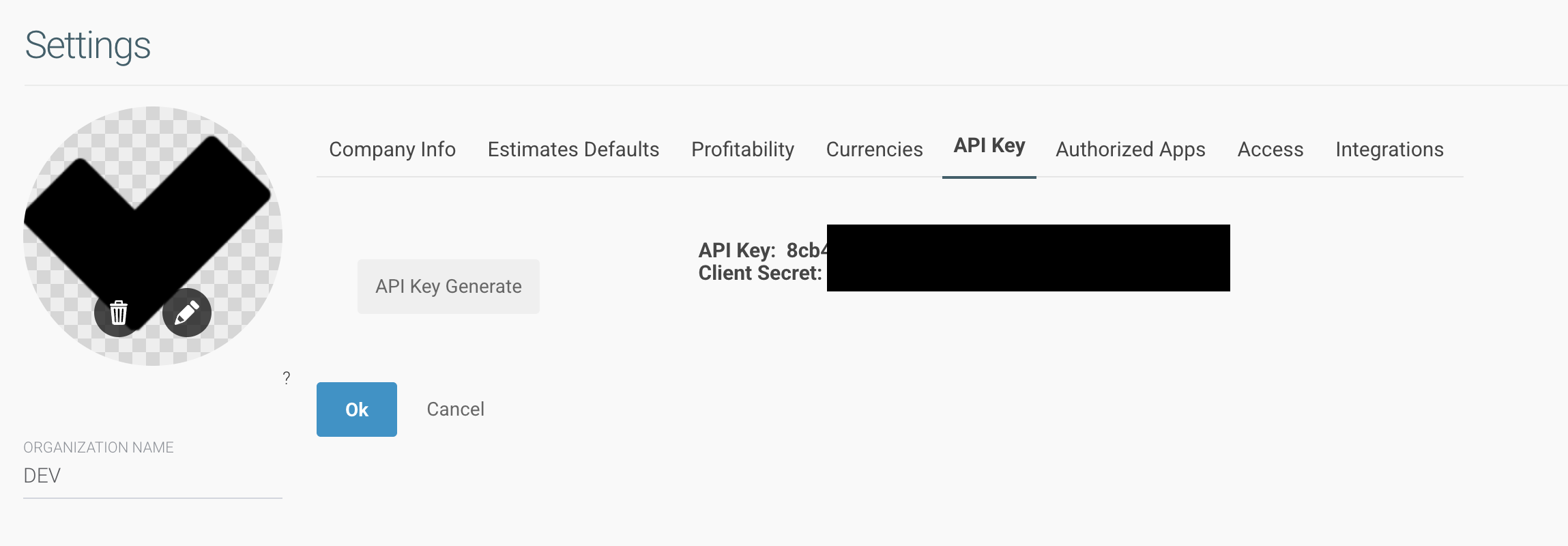
Log in to your COR account and navigate to Settings > Integrations > API.
2

Generate credentials

Click Generate API Key to create a new API Key and Client Secret pair.
COR API Key settings page showing where to generate and manage API credentials
Store your Client Secret securely. It is only displayed once during creation. If you lose it, you must generate new credentials.
3

Encode credentials for authentication

For Client Credentials authentication, encode your credentials in Base64:
echo -n "YOUR_API_KEY:YOUR_CLIENT_SECRET" | base64
This produces a string like WU9VUl9BUElfS0VZOllPVVJfQ0xJRU5UX1NFQ1JFVA== that you use in the Authorization header.

API environments

COR provides three API services that work together to manage your projects, resources, and external integrations.

COR API

Base URL: https://api.projectcor.com/v1Main API for projects, tasks, clients, users, time tracking, and transactions.

Resource Allocation API

Base URL: https://planner.svc.v2.projectcor.comDedicated service for managing user capacity and project allocations.

Integrations API

Base URL: https://integrations.projectcor.com/Service for external system integrations with external ID mapping and bidirectional sync.
All three APIs share the same authentication. Use your access token from the main COR API to authenticate requests to the Resource Allocation API and Integrations API.

Development tools

Import the OpenAPI specification

Import the COR OpenAPI specification into your preferred API client for easy testing:
  1. Open Postman and click Import
  2. Select Link and paste the OpenAPI URL:
https://developers.projectcor.com/api-reference/openapi.json
  1. Click Import to generate a complete collection with all endpoints
Use these HTTP libraries for your integrations:
# Install: pip install requests
import requests

headers = {
    'Authorization': f'Bearer {access_token}',
    'Content-Type': 'application/json'
}

# All list endpoints return paginated responses
response = requests.get(
    'https://api.projectcor.com/v1/projects',
    params={'page': 1},
    headers=headers
)
result = response.json()

# Access paginated data
print(f"Total: {result['total']}, Page: {result['page']}/{result['lastPage']}")
for project in result['data']:
    print(project['name'])

Best practices

Secure token management

Never hardcode API credentials or tokens in your source code. Use environment variables or a secure secrets manager.
# Set environment variables
export COR_API_KEY="your_api_key"
export COR_CLIENT_SECRET="your_client_secret"
import os

api_key = os.environ.get('COR_API_KEY')
client_secret = os.environ.get('COR_CLIENT_SECRET')

Implement automatic token refresh

Access tokens expire after a period of time. Implement automatic refresh to maintain uninterrupted access:
class CORClient {
  constructor(apiKey, clientSecret) {
    this.apiKey = apiKey;
    this.clientSecret = clientSecret;
    this.accessToken = null;
    this.refreshToken = null;
    this.tokenExpiry = null;
  }

  async ensureValidToken() {
    if (!this.accessToken || Date.now() >= this.tokenExpiry) {
      await this.refreshAccessToken();
    }
  }

  async refreshAccessToken() {
    if (this.refreshToken) {
      const response = await fetch(
        'https://api.projectcor.com/v1/oauth/refreshtoken',
        {
          method: 'POST',
          headers: { 'Content-Type': 'application/x-www-form-urlencoded' },
          body: `refresh_token=${this.refreshToken}`
        }
      );
      const data = await response.json();
      this.accessToken = data.access_token;
      this.refreshToken = data.refresh_token;
      this.tokenExpiry = Date.now() + (data.expires_in * 1000);
    } else {
      await this.authenticate();
    }
  }

  async request(endpoint, options = {}) {
    await this.ensureValidToken();
    return fetch(`https://api.projectcor.com/v1${endpoint}`, {
      ...options,
      headers: {
        'Authorization': `Bearer ${this.accessToken}`,
        'Content-Type': 'application/json',
        ...options.headers
      }
    });
  }
}

Handle pagination

All list endpoints return paginated responses by default with the following structure:
{
  "total": "100",
  "perPage": 20,
  "page": 1,
  "lastPage": 5,
  "data": [...]
}
Use the page and perPage parameters to navigate through results:
def get_all_projects(access_token):
    """Fetch all projects across all pages."""
    all_projects = []
    page = 1
    
    while True:
        response = requests.get(
            'https://api.projectcor.com/v1/projects',
            params={'page': page, 'perPage': 50},
            headers={'Authorization': f'Bearer {access_token}'}
        )
        result = response.json()
        
        # Add projects from current page
        all_projects.extend(result['data'])
        
        # Check if we've reached the last page
        if page >= result['lastPage']:
            break
            
        page += 1
    
    return all_projects
By default, list endpoints return 20 items per page. You can increase this up to 50 with the perPage parameter to reduce the number of requests. Set page=false to disable pagination entirely (use with caution on large datasets).


Error handling

HTTP status codes

The COR API uses standard HTTP status codes:
CodeDescriptionAction
200SuccessProcess the response
204Success (No Content)Request succeeded, no body returned
400Bad RequestCheck request parameters and body
401UnauthorizedRefresh or re-obtain access token
404Not FoundVerify the resource ID exists
429Too Many RequestsImplement backoff and retry
500Server ErrorRetry with exponential backoff

Implement retry logic

Handle transient errors with exponential backoff:
import time
import requests

def request_with_retry(url, headers, max_retries=3):
    for attempt in range(max_retries):
        response = requests.get(url, headers=headers)
        
        if response.status_code == 200:
            return response.json()
        
        if response.status_code in [429, 500, 502, 503, 504]:
            wait_time = (2 ** attempt) + 1  # 1s, 3s, 5s
            print(f"Retry {attempt + 1}/{max_retries} after {wait_time}s")
            time.sleep(wait_time)
            continue
        
        # Non-retryable error
        response.raise_for_status()
    
    raise Exception(f"Max retries exceeded for {url}")

Troubleshooting

Causes:
  • Access token has expired
  • Token was not included in the request
  • Token format is incorrect
Solutions:
  1. Verify the token is included: Authorization: Bearer YOUR_TOKEN
  2. Refresh the token using the /oauth/refreshtoken endpoint
  3. Re-authenticate to obtain a new token pair
Causes:
  • Missing required fields in the request body
  • Invalid data types or formats
  • Malformed JSON
Solutions:
  1. Check the API reference for required parameters
  2. Validate JSON syntax before sending
  3. Ensure dates are in the correct format (YYYY-MM-DD)
Causes:
  • User lacks permission for the requested action
  • API key scope is limited
Solutions:
  1. Verify your user has the required permissions in COR
  2. Contact your COR administrator to adjust permissions
Causes:
  • High API traffic
  • Scheduled maintenance
Solutions:
  1. Wait 5 minutes and retry
  2. Implement exponential backoff in your integration
  3. Check COR Status for known issues

Next steps

Need help? Contact our support team at help@projectcor.com or visit COR Support.